Install NVIDIA CUDA Toolkit 13.1.0 on Debian 13 (Trixie)
Table of Contents
This is guide, howto install NVIDIA CUDA Toolkit 13.1.0 on Debian 13 (Trixie). I assume here that you have installed NVIDIA 595.xx drivers successfully using my Debian 13 NVIDIA Drivers Install Guide. You will need NVIDIA 595.58.03 (or newer 595.xx) drivers. As always remember backup important files before doing anything!
Check video version of guide, howto install NVIDIA CUDA on Debian:
Support inttf:

1. Install NVIDIA CUDA Toolkit 13.1.0 on Debian 13 (Trixie)⌗
1.1 Install NVIDIA Drivers >= 595.58.03⌗
Check guide howto install NVIDIA Drivers on Debian 13.
1.2 Download NVIDIA CUDA Toolkit 13.1.0⌗
Download NVIDIA CUDA Toolkit 13.1.0 runfile (local) from official NVIDIA CUDA Toolkit download page.
cd ~/Downloads

wget https://developer.download.nvidia.com/compute/cuda/13.1.0/local_installers/cuda_13.1.0_590.44.01_linux.run

## OR continue download (useful if your download was interrupted) ##
wget -c https://developer.download.nvidia.com/compute/cuda/13.1.0/local_installers/cuda_13.1.0_590.44.01_linux.run
1.3 Make NVIDIA CUDA installer executable⌗
chmod +x cuda_13.1.0*.run
1.4 Change root user⌗
su -
## OR ##
sudo -i
1.5 Make sure that you system is up-to-date and you are running latest kernel⌗
apt update
apt upgrade
After possible kernel update, you should reboot your system and boot using latest kernel:
reboot
1.6 Install needed dependencies⌗
This guide needs following, some NVIDIA CUDA examples might need something else.
apt install build-essential gcc g++ make cmake git pkg-config \
  libglu1-mesa-dev libx11-dev libxi-dev libxmu-dev
1.7 Run NVIDIA CUDA Binary and Install NVIDIA CUDA 13.1.0⌗
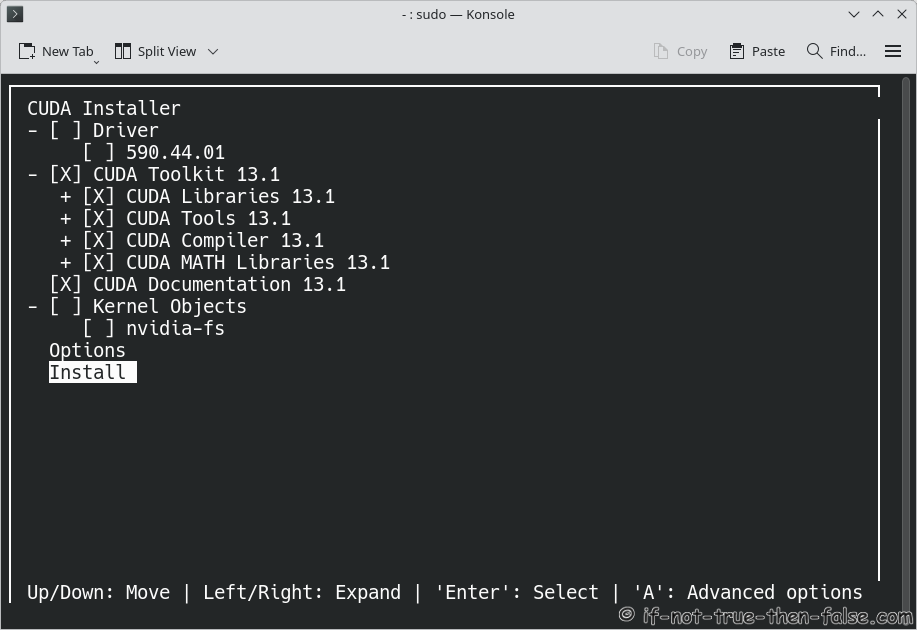
Important: uncheck NVIDIA Drivers from installer, because you already installed NVIDIA drivers using my Debian NVIDIA guide.
/home/<username>/Downloads/cuda_13.1.0_590.44.01_linux.run

## OR full path / full file name ##

./cuda_13.1.0_590.44.01_linux.run

/path/to/cuda_13.1.0_590.44.01_linux.run
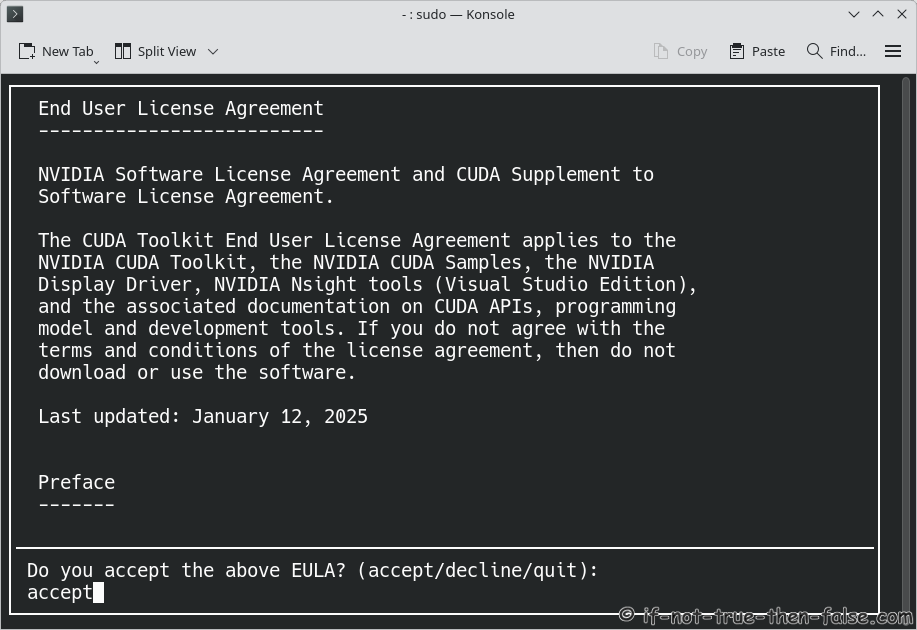
Accept NVIDIA CUDA 13.1.0 License Agreement⌗
Install NVIDIA CUDA, but uncheck NVIDIA Drivers⌗
You can move here using arrows (Up/Down: Move, Left/Right: Expand, Enter/Space: Select and ‘A’: for Advanced Options)
1.8 Post Installation Tasks⌗
Make sure that PATH includes /usr/local/cuda/bin and LD_LIBRARY_PATH includes /usr/local/cuda/lib64. One simple method is to create /etc/profile.d/cuda.sh.
Run following command (copy & paste all lines to console):
cat <<'EOF' > /etc/profile.d/cuda.sh
PATH=/usr/local/cuda/bin:$PATH

case ":${LD_LIBRARY_PATH}:" in
  *:"/usr/local/cuda/lib64":*)
    ;;
  *)
    if [ -z "${LD_LIBRARY_PATH}" ] ; then
      LD_LIBRARY_PATH=/usr/local/cuda/lib64
    else
      LD_LIBRARY_PATH=/usr/local/cuda/lib64:$LD_LIBRARY_PATH
    fi
esac

export PATH LD_LIBRARY_PATH
EOF
Then logout and login
1.9 Test Your Installation, check nvcc version⌗
As a normal user:
nvcc --version
1.10 Clone CUDA Samples from NVIDIA git repo⌗
Run following as normal user:
cd ~

git clone https://github.com/NVIDIA/cuda-samples.git
1.11 Build and run CUDA sample deviceQuery⌗
As a normal user:
Change directory to deviceQuery
cd /home/<username>/cuda-samples/Samples/1_Utilities/deviceQuery
Run cmake
[user@localhost:~/cuda-samples/Samples/1_Utilities/deviceQuery]$ cmake .

-- The C compiler identification is GNU 14.2.0
-- The CXX compiler identification is GNU 14.2.0
-- The CUDA compiler identification is NVIDIA 13.1.80 with host compiler GNU 14.2.0
-- Detecting C compiler ABI info
-- Detecting C compiler ABI info - done
-- Check for working C compiler: /usr/bin/cc - skipped
-- Detecting C compile features
-- Detecting C compile features - done
-- Detecting CXX compiler ABI info
-- Detecting CXX compiler ABI info - done
-- Check for working CXX compiler: /usr/bin/c++ - skipped
-- Detecting CXX compile features
-- Detecting CXX compile features - done
-- Detecting CUDA compiler ABI info
-- Detecting CUDA compiler ABI info - done
-- Check for working CUDA compiler: /usr/local/cuda/bin/nvcc - skipped
-- Detecting CUDA compile features
-- Detecting CUDA compile features - done
-- Found CUDAToolkit: /usr/local/cuda/targets/x86_64-linux/include (found version "13.1.80")
-- Performing Test CMAKE_HAVE_LIBC_PTHREAD
-- Performing Test CMAKE_HAVE_LIBC_PTHREAD - Success
-- Found Threads: TRUE
-- Configuring done (1.8s)
-- Generating done (0.0s)
-- Build files have been written to: /home/inttf/cuda-samples/Samples/1_Utilities/deviceQuery
Run make
[user@localhost:~/cuda-samples/Samples/1_Utilities/deviceQuery]$ make

[ 50%] Building CXX object CMakeFiles/deviceQuery.dir/deviceQuery.cpp.o
[100%] Linking CXX executable deviceQuery
[100%] Built target deviceQuery
Run deviceQuery
[user@localhost:~/cuda-samples/Samples/1_Utilities/deviceQuery]$ ./deviceQuery
./deviceQuery Starting...

CUDA Device Query (Runtime API) version (CUDART static linking)

Detected 1 CUDA Capable device(s)

Device 0: "NVIDIA GeForce RTX 2060"
 CUDA Driver Version / Runtime Version          13.1 / 13.1
 CUDA Capability Major/Minor version number:    7.5
 Total amount of global memory:                 5732 MBytes (6009913344 bytes)
 (030) Multiprocessors, (064) CUDA Cores/MP:    1920 CUDA Cores
 GPU Max Clock rate:                            1695 MHz (1.70 GHz)
 Memory Clock rate:                             7001 Mhz
 Memory Bus Width:                              192-bit
 L2 Cache Size:                                 3145728 bytes
 Maximum Texture Dimension Size (x,y,z)         1D=(131072), 2D=(131072, 65536), 3D=(16384, 16384, 16384)
 Maximum Layered 1D Texture Size, (num) layers  1D=(32768), 2048 layers
 Maximum Layered 2D Texture Size, (num) layers  2D=(32768, 32768), 2048 layers
 Total amount of constant memory:               65536 bytes
 Total amount of shared memory per block:       49152 bytes
 Total shared memory per multiprocessor:        65536 bytes
 Total number of registers available per block: 65536
 Warp size:                                     32
 Maximum number of threads per multiprocessor:  1024
 Maximum number of threads per block:           1024
 Max dimension size of a thread block (x,y,z): (1024, 1024, 64)
 Max dimension size of a grid size    (x,y,z): (2147483647, 65535, 65535)
 Maximum memory pitch:                          2147483647 bytes
 Texture alignment:                             512 bytes
 Concurrent copy and kernel execution:          Yes with 3 copy engine(s)
 Run time limit on kernels:                     No
 Integrated GPU sharing Host Memory:            No
 Support host page-locked memory mapping:       Yes
 Alignment requirement for Surfaces:            Yes
 Device has ECC support:                        Disabled
 Device supports Unified Addressing (UVA):      Yes
 Device supports Managed Memory:                Yes
 Device supports Compute Preemption:            Yes
 Supports Cooperative Kernel Launch:            Yes
 Device PCI Domain ID / Bus ID / location ID:   0 / 1 / 0
 Compute Mode:
    < Default (multiple host threads can use ::cudaSetDevice() with device simultaneously) >

deviceQuery, CUDA Driver = CUDART, CUDA Driver Version = 13.1, CUDA Runtime Version = 13.1, NumDevs = 1
Result = PASS
If you see output and Result = PASS, then NVIDIA CUDA is working.
1.12 Support inttf⌗
Thats all!
Please let me know if you have any problems!