Install NVIDIA CUDA Toolkit 13.1.0 on Fedora 43/42/41
Table of Contents
This is guide, howto install NVIDIA CUDA Toolkit 13.1.0 on Fedora 43/42/41. I assume here that you have installed NVIDIA 595.xx drivers successfully using my Fedora NVIDIA Drivers Install Guide. You will need NVIDIA 595.58.03 (or newer 595.xx) drivers. Fedora 43/42/41 ship GCC 15.x and CUDA 13.1 supports it, but some samples (like deviceQuery) may need a small header patch (see below). As always remember backup important files before doing anything!
Check video version of guide, howto install NVIDIA CUDA on Fedora:
Support inttf:

1. Install NVIDIA CUDA Toolkit 13.1.0 on Fedora 43/42/41⌗
1.1 Install NVIDIA Drivers >= 595.58.03⌗
Check guide howto install NVIDIA Drivers on Fedora.
1.2 Download NVIDIA CUDA Toolkit 13.1.0⌗
Download NVIDIA CUDA Toolkit 13.1.0 runfile (local) from official NVIDIA CUDA Toolkit download page. Only Fedora 42 is listed there, but it works on Fedora 43/41 too.
cd ~/Downloads

wget https://developer.download.nvidia.com/compute/cuda/13.1.0/local_installers/cuda_13.1.0_590.44.01_linux.run
1.3 Make NVIDIA CUDA installer executable⌗
chmod +x cuda_13.1.0*.run
1.4 Change root user⌗
su -
## OR ##
sudo -i
1.5 Make sure that you system is up-to-date and you are running latest kernel⌗
dnf update
After possible kernel update, you should reboot your system and boot using latest kernel:
reboot
1.6 Install needed dependencies⌗
This guide needs following, some NVIDIA CUDA examples might need something else.
dnf install gcc gcc-c++ mesa-libGLU-devel libX11-devel libXi-devel libXmu-devel git make cmake
1.7 Run NVIDIA CUDA Binary and Install NVIDIA CUDA 13.1.0⌗
Fedora 43/42/41⌗
/home/<username>/Downloads/cuda_13.1.0_590.44.01_linux.run

## OR full path / full file name ##

./cuda_13.1.0_590.44.01_linux.run

/path/to/cuda_13.1.0_590.44.01_linux.run
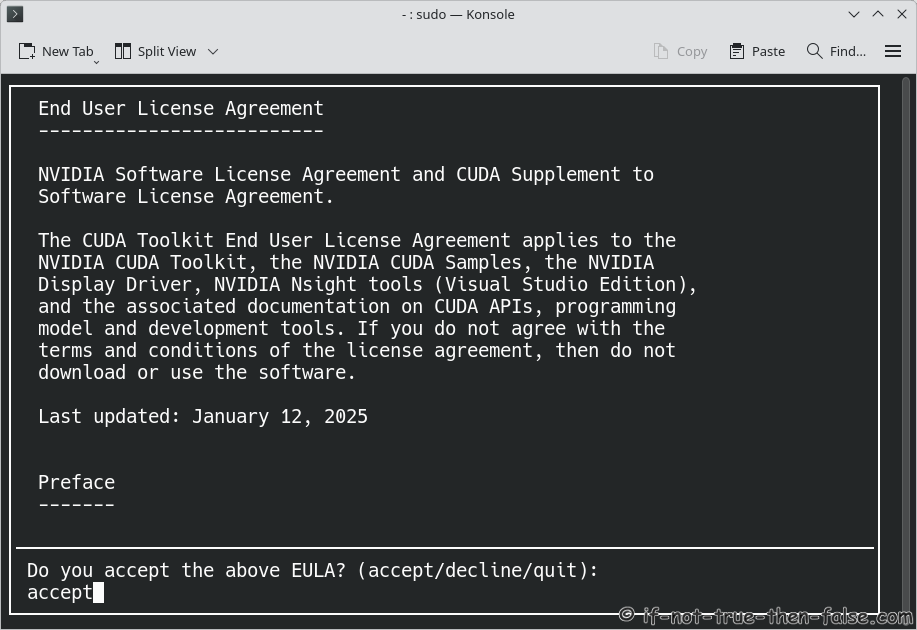
Accept NVIDIA CUDA 13.1.0 License Agreement⌗
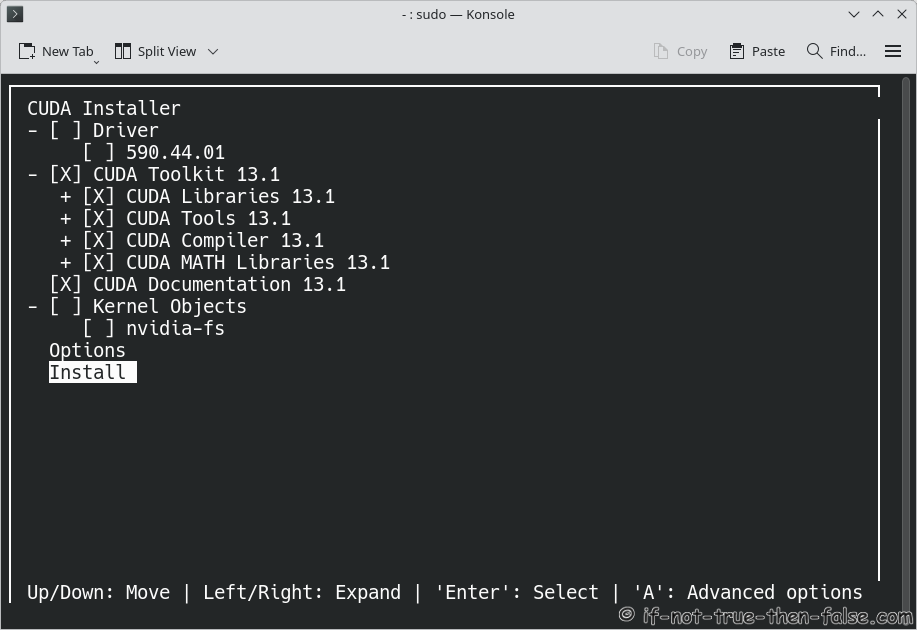
Install NVIDIA CUDA, but uncheck NVIDIA Drivers⌗
You can move here using arrows (Up/Down: Move, Left/Right: Expand, Enter/Space: Select and ‘A’: for Advanced Options)
Clone CUDA Samples from NVIDIA git repo⌗
Run following as normal user.
Note: currently some CUDA samples might need small fixes with CUDA 13.1.0 on Fedora 43/42/41 (see deviceQuery note below).
cd ~

git clone https://github.com/NVIDIA/cuda-samples.git
1.8 Post Installation Tasks⌗
Make sure that PATH includes /usr/local/cuda/bin and LD_LIBRARY_PATH includes /usr/local/cuda/lib64. You can of course do this per user or use some other method, but here is one method to do this. Run following command (copy & paste all lines to console) to create /etc/profile.d/cuda.sh file:
Fedora 43/42/41⌗
cat <<EOF >> /etc/profile.d/cuda.sh
PATH=/usr/local/cuda/bin:\$PATH

case ":\${LD_LIBRARY_PATH}:" in
  *:"/usr/local/cuda/lib64":*)
    ;;
  *)
  if [ -z "\${LD_LIBRARY_PATH}" ] ; then
    LD_LIBRARY_PATH=/usr/local/cuda/lib64
  else
    LD_LIBRARY_PATH=/usr/local/cuda/lib64:\$LD_LIBRARY_PATH
  fi
esac

export PATH LD_LIBRARY_PATH
EOF
Then logout/login. Now as normal user and root you should see something like (depends on your system):
[user@localhost ~]$ echo $PATH
/usr/local/cuda/bin:/usr/share/Modules/bin:/usr/local/bin:/usr/local/sbin:/usr/bin:/usr/sbin:/home/user/.local/bin:/home/user/bin
[user@localhost ~]$ echo $LD_LIBRARY_PATH
/usr/local/cuda/lib64
1.9 Test Your Installation, check nvcc version⌗
As a normal user:
nvcc --version
Built on Fri_Nov__7_07:23:37_PM_PST_2025
Cuda compilation tools, release 13.1, V13.1.80
Build cuda_13.1.r13.1/compiler.36836380_0
1.10 Build and run CUDA sample deviceQuery⌗
1.10.1 (Fedora 43/42/41 / GCC 15.x) Patch math_functions.h for deviceQuery⌗
On Fedora 43/42/41 (GCC 15.x + newer glibc headers), you may hit a build error due to a mismatch between CUDA headers and glibc math.h. The simplest path is to patch the CUDA header math_functions.h to match the glibc prototype.
Run the following:
sudo patch -b /usr/local/cuda/targets/x86_64-linux/include/crt/math_functions.h << 'EOF'
--- a/math_functions.h
+++ b/math_functions.h
@@ -626,7 +626,7 @@
  *
  * \note_accuracy_double
  */
-extern __DEVICE_FUNCTIONS_DECL__ __device_builtin__ double                 rsqrt(double x);
+extern __DEVICE_FUNCTIONS_DECL__ __device_builtin__ double                 rsqrt(double x) noexcept (true);

 /**
  * \ingroup CUDA_MATH_SINGLE
@@ -650,7 +650,7 @@
  *
  * \note_accuracy_single
  */
-extern __DEVICE_FUNCTIONS_DECL__ __device_builtin__ float                  rsqrtf(float x);
+extern __DEVICE_FUNCTIONS_DECL__ __device_builtin__ float                  rsqrtf(float x) noexcept (true);

 #if defined(__QNX__) && !defined(_LIBCPP_VERSION)
 namespace std {
EOF
Change directory to deviceQuery
cd /home/<username>/cuda-samples/Samples/1_Utilities/deviceQuery
Run cmake
[user@localhost:~/cuda-samples/Samples/1_Utilities/deviceQuery]$ cmake .

-- The C compiler identification is GNU 15.2.1
-- The CXX compiler identification is GNU 15.2.1
-- The CUDA compiler identification is NVIDIA 13.1.80 with host compiler GNU 15.2.1
-- Detecting C compiler ABI info
-- Detecting C compiler ABI info - done
-- Check for working C compiler: /usr/bin/cc - skipped
-- Detecting C compile features
-- Detecting C compile features - done
-- Detecting CXX compiler ABI info
-- Detecting CXX compiler ABI info - done
-- Check for working CXX compiler: /usr/bin/c++ - skipped
-- Detecting CXX compile features
-- Detecting CXX compile features - done
-- Detecting CUDA compiler ABI info
-- Detecting CUDA compiler ABI info - done
-- Check for working CUDA compiler: /usr/local/cuda/bin/nvcc - skipped
-- Detecting CUDA compile features
-- Detecting CUDA compile features - done
-- Found CUDAToolkit: /usr/local/cuda/targets/x86_64-linux/include;/usr/local/cuda/targets/x86_64-linux/include/cc
cl (found version "13.1.80")
-- Performing Test CMAKE_HAVE_LIBC_PTHREAD
-- Performing Test CMAKE_HAVE_LIBC_PTHREAD - Success
-- Found Threads: TRUE
-- Configuring done (1.8s)
-- Generating done (0.0s)
-- Build files have been written to: /home/inttf/cuda-samples/Samples/1_Utilities/deviceQuery
Run make
[user@localhost:~/cuda-samples/Samples/1_Utilities/deviceQuery]$ make

[ 50%] Building CXX object CMakeFiles/deviceQuery.dir/deviceQuery.cpp.o
[100%] Linking CXX executable deviceQuery
[100%] Built target deviceQuery
Run deviceQuery
[user@localhost:~/cuda-samples/Samples/1_Utilities/deviceQuery]$ ./deviceQuery
./deviceQuery Starting...

CUDA Device Query (Runtime API) version (CUDART static linking)

Detected 1 CUDA Capable device(s)

Device 0: "NVIDIA GeForce RTX 2060"
 CUDA Driver Version / Runtime Version          13.1 / 13.1
 CUDA Capability Major/Minor version number:    7.5
 Total amount of global memory:                 5732 MBytes (6009913344 bytes)
 (030) Multiprocessors, (064) CUDA Cores/MP:    1920 CUDA Cores
 GPU Max Clock rate:                            1695 MHz (1.70 GHz)
 Memory Clock rate:                             7001 Mhz
 Memory Bus Width:                              192-bit
 L2 Cache Size:                                 3145728 bytes
 Maximum Texture Dimension Size (x,y,z)         1D=(131072), 2D=(131072, 65536), 3D=(16384, 16384, 16384)
 Maximum Layered 1D Texture Size, (num) layers  1D=(32768), 2048 layers
 Maximum Layered 2D Texture Size, (num) layers  2D=(32768, 32768), 2048 layers
 Total amount of constant memory:               65536 bytes
 Total amount of shared memory per block:       49152 bytes
 Total shared memory per multiprocessor:        65536 bytes
 Total number of registers available per block: 65536
 Warp size:                                     32
 Maximum number of threads per multiprocessor:  1024
 Maximum number of threads per block:           1024
 Max dimension size of a thread block (x,y,z): (1024, 1024, 64)
 Max dimension size of a grid size    (x,y,z): (2147483647, 65535, 65535)
 Maximum memory pitch:                          2147483647 bytes
 Texture alignment:                             512 bytes
 Concurrent copy and kernel execution:          Yes with 3 copy engine(s)
 Run time limit on kernels:                     No
 Integrated GPU sharing Host Memory:            No
 Support host page-locked memory mapping:       Yes
 Alignment requirement for Surfaces:            Yes
 Device has ECC support:                        Disabled
 Device supports Unified Addressing (UVA):      Yes
 Device supports Managed Memory:                Yes
 Device supports Compute Preemption:            Yes
 Supports Cooperative Kernel Launch:            Yes
 Device PCI Domain ID / Bus ID / location ID:   0 / 1 / 0
 Compute Mode:
    < Default (multiple host threads can use ::cudaSetDevice() with device simultaneously) >

deviceQuery, CUDA Driver = CUDART, CUDA Driver Version = 13.1, CUDA Runtime Version = 13.1, NumDevs = 1
Result = PASS
1.11 Support inttf⌗
Thats all!
Please let me know if you have any problems!